
Highlight Priority Orders for WooCommerce – Next-Day & Express Shipping at a Glance
Never miss a next-day, express or VIP order again

Overview
Highlight Priority Orders for WooCommerce is a lightweight plugin that visually flags important orders in your WooCommerce admin, so your fulfilment team can spot and ship them first without digging through every order.
This is a premium only plugin
HPOS Compatible
Highlights priority orders by whole row, no more order statuses or priority pills to sort through
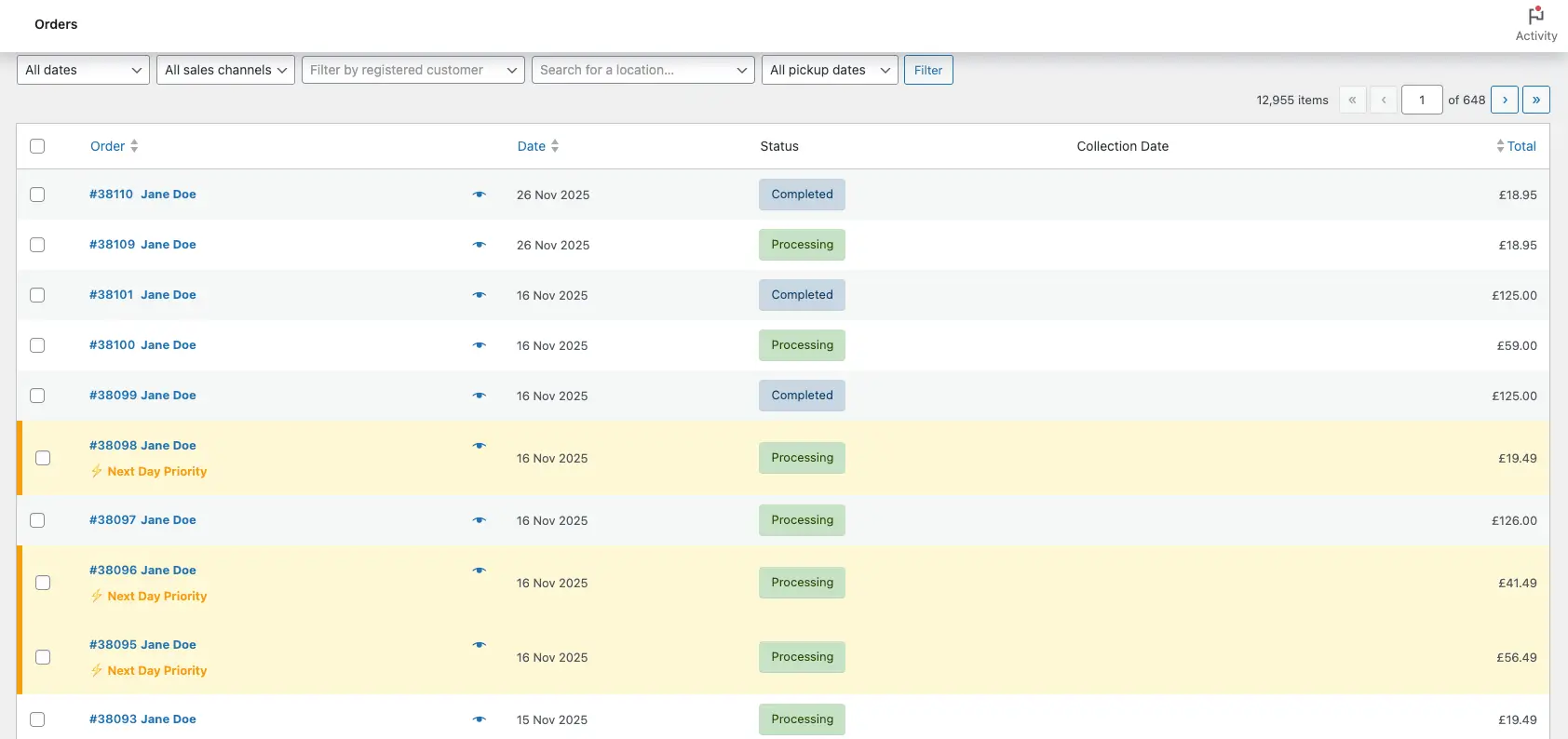
Soft highlight colours on priority orders in the Orders table
A clear ⚡ “Next-day” style tag right inside the order row (text and icon are customisable)
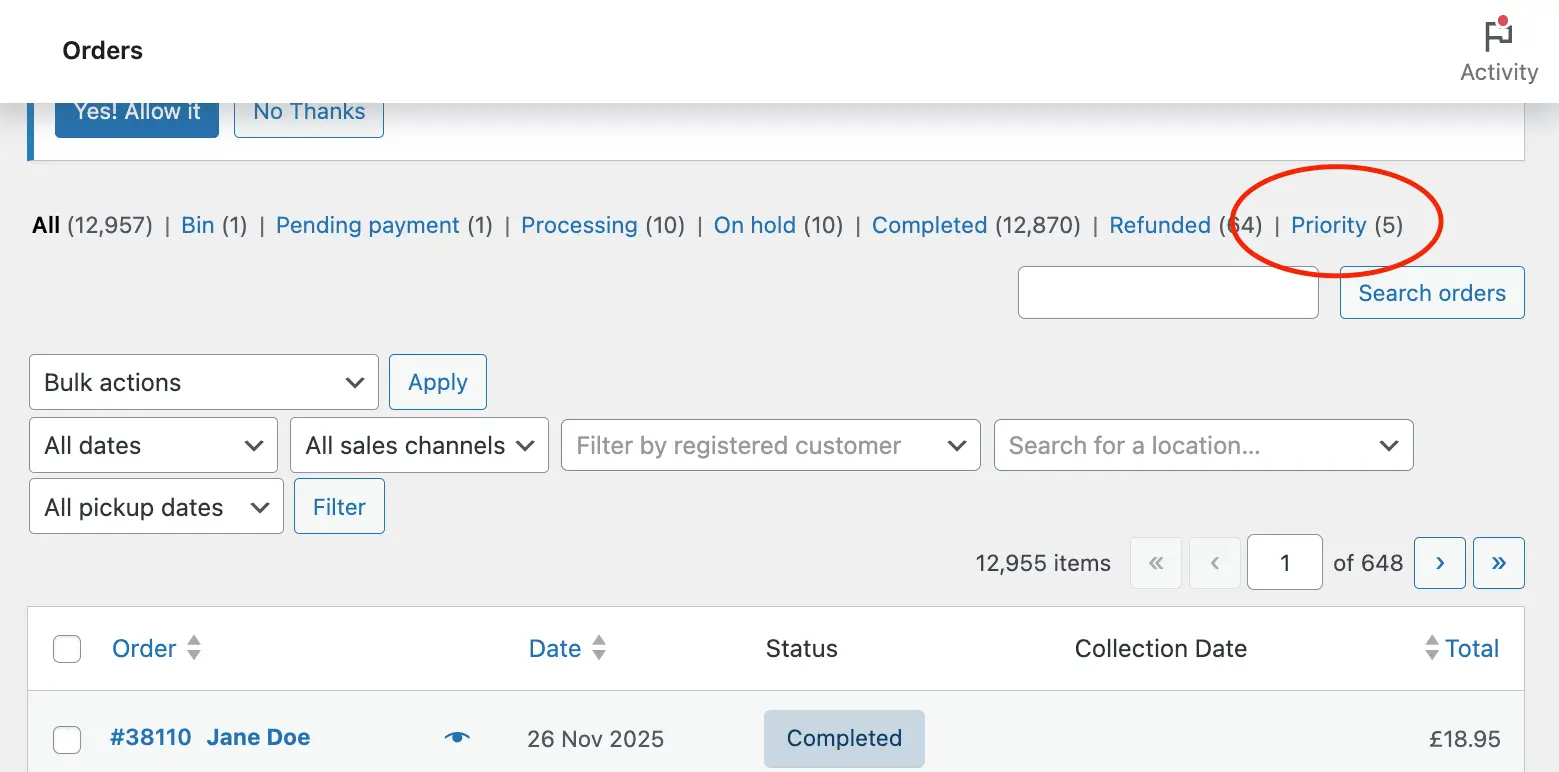
A dedicated “Priority” filter so you can show only urgent orders in one click
Specs
wordpress 6.2+
1.0.1
January, 14, 2026
GPLv2 or later
What the plugin does
Out of the box, WooCommerce treats all “Processing” orders the same. That’s fine until you add:
- Next-day or same-day shipping
- Express courier methods (DHL Express, UPS Express, Royal Mail Special Delivery, etc.)
- VIP / priority shipping tiers
Your team then has one question:
“Which orders do we need to ship right now?”
Highlight Priority Orders for WooCommerce answers that question by:
- Highlighting specific orders in the Orders list with a coloured background and border
- Adding a clear tag (e.g. “⚡ Next-day” or “Express”) to those orders
- Giving you a “Priority” filter so you can view only priority orders with a single click
You choose which shipping methods and which order statuses count as “priority”. The plugin handles the rest.
Key benefits at a glance
- Never miss a priority order again – next-day / express orders stand out visually
- Faster packing & dispatch – your team can jump straight to the “Priority” filter
- Happier customers – priority shipping customers actually get the priority they paid for
- Works with your existing shipping setup – no need to change shipping plugins or zones
- Lightweight & focused – no complex rule engines, bulk automation or bloated dashboards
How it works in your day-to-day workflow
- Configure once
- Install and activate the plugin
- Choose your priority shipping methods and statuses
- Optionally set custom tag text and colours
- Open WooCommerce → Orders
- Priority orders appear with a highlighted background and tag
- The new Priority filter shows how many are currently queued
- Work through the priority queue
- Click the Priority filter
- Pack and ship those orders first
- Mark them Completed – the highlight disappears
- Then handle the rest
- Switch back to All or Processing and handle normal orders
No extra screens, no new workflows – just a smarter Orders page.
Real-world examples
Here are some common setups that work really well with Highlight Priority Orders for WooCommerce:
Next-day courier with cut-off time
You offer:
- Standard Shipping (2–3 days)
- Next-Day Delivery (order before 2pm)
Configure the plugin to:
- Highlight orders using the “Next-Day Delivery” shipping method
- Only when status = Processing
Each morning and just before your courier collection, your team can:
- Click Priority
- Pack all next-day orders first
- Then move onto standard shipping
Express & international upgrades
You offer:
- Free domestic shipping
- Paid express option
- International courier options
Use shipping method IDs plus keywords, e.g.:
- Select method IDs for paid express and international options
- Add keywords such as “Express”, “Priority”, “Courier” via the filter
Any order that uses those methods (or includes those words in the shipping title) and has the right status will be highlighted.
VIP / “rush” customers
If you maintain special shipping options for VIP or B2B customers (e.g. “VIP Rush Shipping”, “Trade Express”), simply:
- Select those shipping methods
- Use a tag like ⭐ VIP Order
Your team can instantly see high-value customer orders and treat them accordingly.
Get started
Ready to stop hunting for next-day and express orders in your WooCommerce dashboard?
- Install Highlight Priority Orders for WooCommerce
- Configure your shipping methods and statuses
- Let your fulfilment team enjoy a clear, visual priority queue every day
Download Highlight Priority Orders for WooCommerce and start highlighting your next-day and express orders in minutes.
Pricing
Free
All free features
This is a premium only plugin
Premium
Includes all free features, plus:
-
HPOS Compatible
★ -
Highlights priority orders by whole row, no more order statuses or priority pills to sort through
★ -
Soft highlight colours on priority orders in the Orders table
★ -
A clear ⚡ “Next-day” style tag right inside the order row (text and icon are customisable)
★ -
A dedicated “Priority” filter so you can show only urgent orders in one click
★
Screenshots
Frequently Asked Questions
Do I need to configure both shipping methods and order statuses?
You must configure at least:
- One or more order statuses (e.g. Processing), and
- Either shipping methods or keywords
Without at least one shipping method or keyword, the plugin won’t know which orders are “priority” and nothing will be highlighted.
Why aren’t my orders being highlighted?
Check the following:
Shipping methods –
Go to WooCommerce → Priority Orders and make sure you’ve selected at least one shipping method, or configured keywords via the filter.
Order status –
Confirm that your orders are in a status you’ve chosen (e.g. Processing). If they’re Completed, they won’t be highlighted.
Can I customise the colours and tag text?
Yes. In WooCommerce → Settings → Priority Orders you can:
- Change the tag text (e.g. “Express”, “Urgent”, “Priority”, “Ship this NOW!”)
- Change or remove the tag emoji
- Choose the highlight background colour
- Choose the border / tag accent colour
All appearance settings are optional – if you like the defaults, you can leave them as they are.
What’s the difference between using shipping methods and keywords?
- Shipping methods (UI setting)
You pick exact method IDs (e.g. flat_rate:5). This is precise and doesn’t require code. - Keywords (code filter)
You define words like “Express”, “Next Day”, “Priority”. Any shipping method name containing those words will be treated as priority. This is more flexible, especially when you have many similar methods, but it requires adding a small PHP snippet.
You can use both at the same time – an order only needs to match one method or keyword (plus the right status) to be highlighted.
Will this slow down my site?
No. The plugin:
- Only runs on the WooCommerce Orders admin screen
- Uses efficient database queries and light caching for the Priority count
- Doesn’t add any assets or scripts to the front-end of your site
In normal use, you shouldn’t notice any performance impact.
Can I highlight orders based on other criteria (e.g. order total, products, customer type)?
The plugin is focused on shipping-based priority orders (method IDs and keywords, plus status).
If you need more complex logic (e.g. high-value orders, certain products, specific customers), you’re welcome to reach out on the link below to discuss custom development or future enhancements.
I'm using HPOS?
That’s fine, tested and fully compatible, enjoy.
Need Support?
Have a question or need help with Highlight Priority Orders for WooCommerce – Next-Day & Express Shipping at a Glance? Our team is here to assist you.
Contact SupportHave an Idea?
Got a suggestion for a new feature or an improvement for Highlight Priority Orders for WooCommerce – Next-Day & Express Shipping at a Glance? We'd love to hear it!
Suggest a Feature